Cross-tenant Microsoft 365 migrations are often discussed in terms of Exchange mailboxes, OneDrive accounts, and SharePoint document libraries. Microsoft Teams, however, is where cross-tenant moves become significantly more complex.
Teams is not an isolated workload. It is an aggregation layer connecting Microsoft Entra ID, Microsoft 365 Groups, Exchange Online, SharePoint Online, OneDrive, custom apps, bots, and organizational governance rules. A change in any of these underlying services directly impacts the end-user Teams experience. Moving Teams between tenants is never a simple matter of recreating teams and copying channel chats.
While native capabilities like the Microsoft 365 Migration Orchestrator continue to evolve (supporting user-scoped chats and meeting moves), shared collaboration spaces (Teams, channels, apps, and underlying storage) require an independent strategy. For organizations navigating a merger, acquisition, or divestiture, Teams must be evaluated as its own distinct workstream.
Here is how the hidden dependencies within Teams impact cross-tenant migrations, and how to navigate them effectively.
1. Teams Architecture: The Dependency Web
To understand why Teams migrations break, you must understand what sits beneath the surface. A single Team relies on a web of interconnected Microsoft 365 services:
- Microsoft Teams: Team and channel experience, conversations, meetings, apps, and bots
- Microsoft 365 Group: Identity, membership, owners, and expiration policies
- SharePoint Online: Team site, channel files, and private or shared channel sites
- Exchange Online: Group mailbox, shared calendar, and meeting recordings
- Microsoft Entra ID: User objects, group GUIDs, authentication, and app registrations
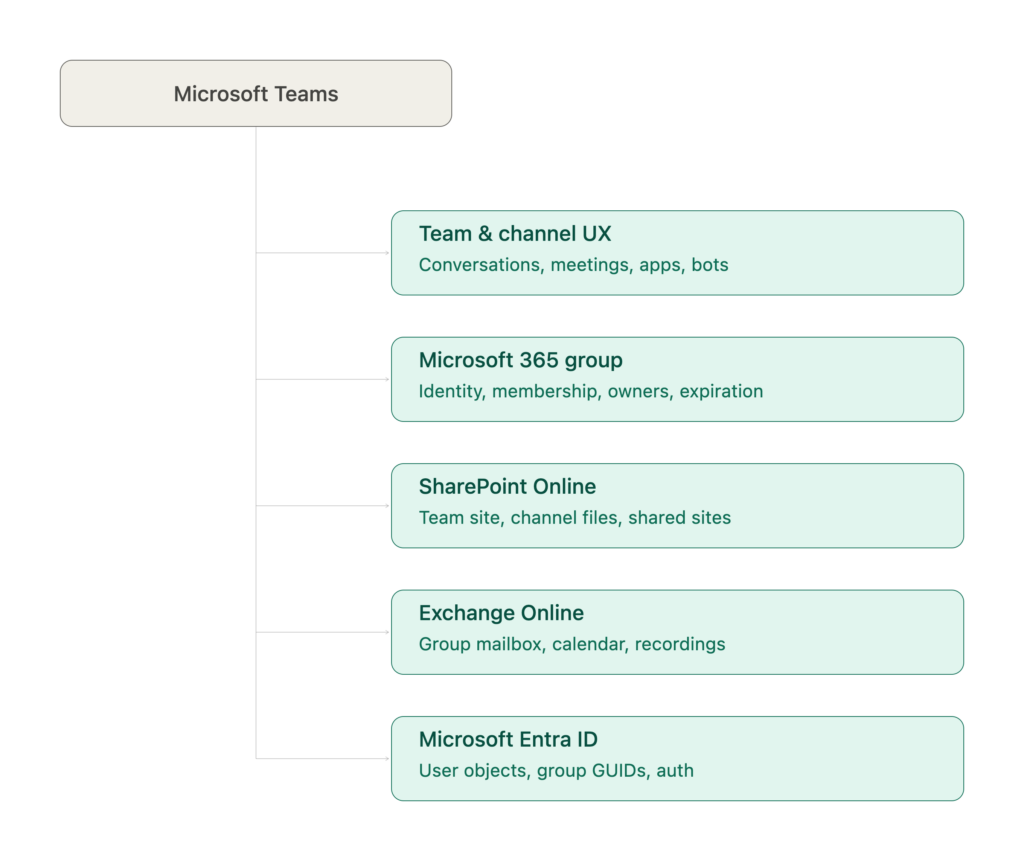
Recreating a Team in a target tenant does not automatically recreate the dependencies that made the original space work. A successful target blueprint requires pre-migration inventory covering team metadata, group GUIDs, channel types, installed apps, meeting dependencies, and compliance policies.
2. Microsoft 365 Group & Entra ID Dependencies
Every Team is bound to a Microsoft 365 Group. Creating a new Team in the target tenant, even with an identical display name, generates completely new Object IDs in Microsoft Entra ID.
This break in object identity impacts Power Automate flows, Graph API scripts, custom solutions, and permissions reliant on underlying GUIDs.
As explored in our previous deep dive on Microsoft Entra ID in Cross-Tenant Migrations, cross-tenant synchronization can facilitate user collaboration during transition phases, but it is not a data migration tool. Identity mapping tables must account for Groups, Teams, Channels, App Registrations, and SharePoint URLs simultaneously.
3. The Nuances of Channel Membership & Types
Standard channels inherit membership directly from the parent Team. Private and Shared channels do not.
| Channel Type | Membership Architecture | Migration Impact |
| Standard | Inherits parent Team membership | Recreating Team membership covers channel access. |
| Private | Strict subset of Team members with dedicated SharePoint site | Requires separate inventory and permission mapping to prevent data loss. |
| Shared | Allows internal and external members without adding them to the Team | Requires Entra ID B2B Direct Connect and cross-tenant access alignment. |
Migrating Team members without mapping channel-specific identities leads to broken access, missing files, and compromised security boundaries in sensitive spaces like HR, Legal, or M&A.
4. Meeting Recordings & Links
Teams meeting recordings are split across two storage locations depending on how the meeting was scheduled:
- Standard or Private Meetings: Stored in the meeting organizer’s personal OneDrive.
- Channel Meetings: Stored in the channel’s dedicated SharePoint site (/Recordings folder).
When mailboxes and user data move across tenant boundaries, meeting join URLs do not automatically update to match the new target domain. Organizations must inventory recurring executive meetings, town halls, and compliance-bound recordings early to prevent broken links post-cutover.
5. Teams Apps, Bots, & Custom Integrations
As noted in our guide on What Actually Moves and What Doesn’t, customized tabs, third-party apps, and custom bots do not natively transfer.
A custom bot, for example, relies on an Entra App Registration, Service Principal, OAuth permissions, and Azure back-end services. Reinstalling the app manifest in the target tenant will result in silent failure if the bot still attempts to authenticate against the source tenant’s Entra ID. Custom apps must be audited, re-packaged, and re-authenticated in the target environment.
6. Preserving Governance & Operating Models
The ultimate goal of a Teams migration is not just data replication: it is restoring an enterprise’s governance model. A migration should maintain or improve:
- Sensitivity labels and Information Barriers
- Lifecycle, expiration, and naming policies
- External/Guest sharing limits and App setup policies
- Expiration rules to eliminate stale or orphaned Teams
How Olive + Goose Can Help
Navigating the hidden web of Teams dependencies requires more than basic migration tools. It takes deep architectural expertise across identity, security, and workload management.
Olive + Goose partners with enterprise organizations to plan, execute, and secure complex cross-tenant transitions:
- Comprehensive Teams & Dependency Discovery: We run automated discovery across your source environment to map Teams, private/shared channels, third-party apps, custom bots, and Entra ID object relationships.
- Identity & Mapping Strategy: We design robust identity-mapping frameworks that preserve channel permissions, governance policies, and external collaboration boundaries.
- Application & Bot Remediation: Our Microsoft 365 and Azure engineers re-architect app registrations, update Graph API endpoints, and reconfigure custom bots to ensure day-one functionality.
End-to-End Cutover Execution: From coexistence design to hypercare support, we ensure your users log in on day one with full access to their teams, files, and channels without security gaps or broken workflows.
The Bottom Line
A successful Teams migration is not measured by how many Team names appear in the target tenant on Monday morning. It is measured by whether your workforce can pick up their conversations, collaborate securely with internal and external peers, and run their integrated applications without disruption.
Planning a complex tenant-to-tenant migration? Contact the enterprise IT experts at Olive + Goose to build a seamless migration strategy.
Read the Rest of the Series