When planning a cross-tenant Microsoft 365 migration, it’s easy to focus entirely on the highly visible workloads. Project managers naturally ask: How long will it take to move Exchange Online mailboxes? Are the SharePoint Online document libraries mapped? Have we pre-staged OneDrive data? What about Microsoft Teams?
Yet, the single most critical component of the entire migration often receives the least attention: Microsoft Entra ID(formerly Azure Active Directory).
Identity is the foundational plumbing of your entire cloud infrastructure. If your identity planning is incomplete, even a technically perfect data migration will fall apart on day one. When users cannot authenticate, applications break, and security policies lock out legitimate staff, a migration is deemed a failure—no matter how fast the mailboxes moved.
In our previous articles, we explored the hidden risks of cross-tenant migrations and clarified exactly what Microsoft’s native migration tools can—and cannot—actually move. Today, we dive deep into the identity layer that underpins every Microsoft 365 service and explain why Microsoft Entra ID deserves its own dedicated migration workstream.
Why Microsoft Entra ID Cannot Just Be “Copied”
Unlike a mailbox or a file share, you cannot simply copy and paste an identity platform. Every Microsoft 365 tenant represents an isolated security boundary. Objects created in the source tenant do not natively exist or carry over to the target tenant.
Microsoft Entra ID serves as the secure gateway for your tenant, controlling:
- User Authentication & Single Sign-On (SSO)
- Group Memberships & Dynamic Rules
- Conditional Access Policies
- Multi-Factor Authentication (MFA) Registrations
- Enterprise Applications & Service Principals
Believing that a standard migration tool will handle identity automatically is one of the most common and costly assumptions a migration team can make.
The Cross-Tenant Access Settings Solution
Rather than starting from scratch, modern migration strategies rely heavily on establishing structural trust between the source and target environments before any data moves.
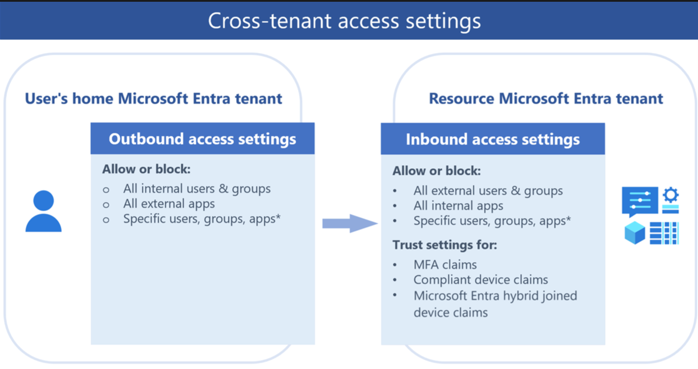
Microsoft Entra ID provides Cross-Tenant Access Settings to define how your tenant collaborates with other Microsoft Entra organizations. Configuring this early is the key to minimizing user friction during a phased migration.
By establishing these secure relationships, you can configure the target tenant to trust authentication and compliance claims directly from the source tenant. For example, if a user has already completed Multi-Factor Authentication (MFA) or is on a compliant device in the source tenant, the target tenant can honor those claims without forcing the user to sign in or register their MFA device again during the coexistence phase.
Identity Mapping: The Matching Problem
Every object in Microsoft Entra ID is defined by unique backend identifiers that do not translate across tenant boundaries, including:
- Object ID: The unique GUID representing the user or group.
- Immutable ID (sourceAnchor): The anchor that links an on-premises Active Directory identity to its cloud counterpart.
- User Principal Name (UPN): The primary sign-in address.
To ensure that migrated data (such as emails or shared files) successfully reconnects with its rightful owner in the target tenant, you must construct an Identity Mapping Matrix.
| Source Identity Attribute | Target Identity Attribute | Migration Impact |
| [email protected] | [email protected] | Primary sign-in changes; requires UPN update. |
| Source Object ID (GUID-A) | Target Object ID (GUID-B) | Deep links and direct permissions must be remapped. |
| Member of Source Group HR-All | Member of Target Group HR-Dept | Access to departmental SharePoint sites must be rebuilt. |
| Source OneDrive Owner (user1_source…) | Target OneDrive Owner (user1_target…) | Native tools require explicit mapping to transfer folder ownership. |
This mapping becomes exponentially more complex if your migration involves renaming users, consolidating active domains, merging multiple directory sources, or cleaning up stale directory objects.
The MFA Transition Strategy
One of the most common post-migration helpdesk complaints is: “I can’t log in because it’s asking for an MFA method I haven’t set up yet.”
MFA registrations including Microsoft Authenticator setups, FIDO2 security keys, and phone numbers are securely bound to the specific tenant in which they were created. They cannot be migrated. Your users must register their MFA methods in the target tenant.
To handle this smoothly without leaving your network exposed, we recommend a four-step phased transition:
- Audit and Communicate (2–3 Weeks Before Cutover): Inventory existing user authentication methods. Send targeted, clear instructions to users warning them that they will need to register their authentication methods on day one.
- Issue Temporary Access Passes (TAP) (Migration Eve): Deploy Temporary Access Passes—a time-limited, one-time passcode generated in the target tenant. This allows users to securely log in for the first time without needing to complete an initial MFA challenge they haven’t set up yet.
- Enforce Target Registration (Day One): Require users to use their TAP to register their new security methods (like the Microsoft Authenticator app) during their very first session.
- Post-Migration Clean-up: Once validation is complete, disable legacy authentication methods in the target tenant and clean up stale credentials in the source tenant.
Rebuilding the Security Perimeter: Conditional Access
Conditional Access (CA) is the engine that decides whether a login attempt is safe or suspicious. Because CA policies evaluate internal variables unique to your tenant such as specific user groups, named network locations, and device compliance states they cannot be simply exported and imported.
A tenant migration is the perfect opportunity to run a “security audit.” Rather than copying outdated or redundant policies, take the time to:
- Inventory existing policies: Document which policies are active, who they target, and what exclusions are in place.
- Consolidate and modernize: Transition legacy policies to modern templates, ensuring you utilize Microsoft’s latest authentication strengths.
- Establish Emergency Access: Ensure you configure new “break-glass” administrative accounts in the target tenant that are explicitly excluded from strict CA rules to prevent accidental lockouts.
Enterprise Applications and Service Principals
Modern enterprises run on SaaS applications. If your business relies on single sign-on (SSO) or automated integrations with platforms like Salesforce, ServiceNow, Adobe, or custom line-of-business apps, you must prepare for application migration.
Each of these integrations depends on:
- Enterprise Application Registrations: The trust configuration inside Entra ID.
- Service Principals: The secure identity used by the application or automated scripts (e.g., Azure Logic Apps, Power Automate, or custom APIs) to interact with Microsoft Graph.
During migration, you must recreate these registrations in the target tenant. This means your teams will need to update redirect URIs, re-upload SAML certificates, request fresh API permissions, and re-assign user and group permissions. Failing to inventory these dependencies early will lead to immediate automation and business-process failures the moment the source tenant is deactivated.
The Identity Migration Checklist
Before you schedule your migration weekend, ensure your identity workstream has verified every item on this checklist:
- Cross-Tenant Access Settings configured and tested.
- Identity mapping file validated and uploaded to migration tools.
- Temporary Access Pass (TAP) policy enabled and ready for end-user onboarding.
- Conditional Access policies built and staged in “Report-Only” mode in the target tenant.
- Enterprise Applications and SSO configurations inventoried and scheduled for target tenant cutover.
- Service Principals and API certificates recreated in the target environment.
- Emergency administrative accounts verified in the target tenant.
Final Thoughts
A successful cross-tenant migration is not measured by the speed at which you move mailboxes or gigabytes of data. It is measured by how quickly and securely your users can get back to work on Monday morning.
By treating Microsoft Entra ID as its own dedicated, foundational migration workstream, you protect your organization’s security posture, dramatically reduce helpdesk ticket volume, and ensure a seamless, professional experience for your employees.
Planning a complex tenant-to-tenant migration? Let’s get your identity architecture right from day one. Reach out to the migration experts at Olive + Goose.
Continue the Series
- Part 1: The Overlooked Risks of Cross-Tenant Microsoft 365 Migrations
- Part 2: Cross-Tenant Microsoft 365 Migration: What Actually Moves and What Doesn’t