One of the biggest mistakes small businesses make with Microsoft 365 is treating licensing as a one-time decision. In reality, the platform is designed to scale in layers. Starting too small creates security gaps. Starting too big wastes money. The right approach is progressive onboarding, where licensing grows with real needs, not assumptions.
This is the licensing methodology we recommend and deploy.
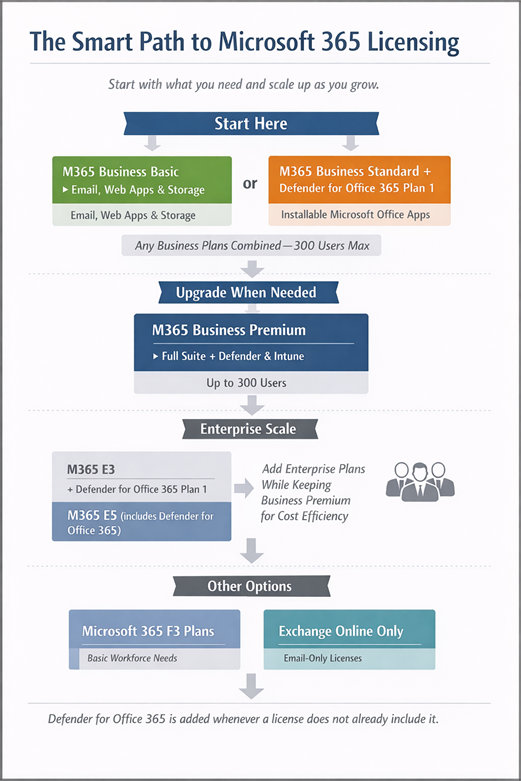
Start simple: Microsoft 365 Business Basic plus Defender for Office 365 Plan 1.
For organizations that only need email, calendaring, and cloud file storage, Microsoft 365 Business Basic is the correct starting point. It provides Exchange Online, OneDrive, SharePoint, and Teams without desktop Office applications.
On its own, Business Basic is incomplete from a security perspective. We always add Defender for Office 365 Plan 1 when it is not included in the base suite. This introduces phishing protection, safe links, safe attachments, and baseline email threat visibility. Secure email is not optional at any size.
Move up when Office apps are required: Microsoft 365 Business Standard plus Defender for Office 365 Plan 1.
When users need desktop versions of Word, Excel, PowerPoint, or Outlook, the next step is Business Standard. It builds on Business Basic by adding Microsoft 365 Apps for desktop while keeping the same collaboration and storage foundation.
Security requirements do not change just because Office apps are installed. Defender for Office 365 Plan 1 is still required when it is not bundled. Business Standard without modern email protection remains exposed.
Consolidate and mature: Microsoft 365 Business Premium.
Microsoft 365 Business Premium is where Microsoft 365 becomes a complete small business platform. It includes Defender for Office 365 Plan 1, Defender for Business, and full device and identity management through Intune and Entra ID.
For many organizations, Business Premium becomes the long-term standard. Even as companies grow and introduce Enterprise licensing, Business Premium plans can and often should remain in use for appropriate users to control costs while maintaining strong security and device management.
Scale beyond 300 users: Enterprise plans.
Business plans scale to 300 users, but that does not mean everything must convert to Enterprise licensing overnight. When organizations approach or exceed that threshold, Enterprise plans are introduced selectively, based on role, compliance needs, and scale requirements.
The same uplift methodology applies. Start with core services, then layer in security, compliance, and endpoint capabilities. Defender for Office 365 Plan 1 is added whenever an Enterprise suite does not already include it. Security baselines remain consistent across license types.
Alternate paths for limited needs.
Not every role requires the same capabilities. Microsoft 365 F3 plans support frontline workers who need basic communication without large storage or advanced tooling. Email-only plans exist for narrowly defined use cases. These are valid options when used intentionally, not as default cost-cutting measures.
The key principle.
Microsoft 365 works best when licensing reflects actual usage and risk. Start with secure email. Add productivity when needed. Consolidate security and management as the organization matures. Mixing Business and Enterprise plans thoughtfully is often the most cost-effective and operationally sound approach.
How Olive + Goose helps.
Olive + Goose helps organizations migrate to Microsoft 365, right-size licensing from day one, and continuously adjust as the business grows. We ensure Defender for Office 365 Plan 1 is deployed wherever it is required, reduce unnecessary licensing spend, and keep environments secure and manageable over time.
Call to action.
If you are unsure whether your Microsoft 365 licensing strategy is aligned with how your business actually operates, Olive + Goose can help you design and manage it the right way. Reach out at [email protected].