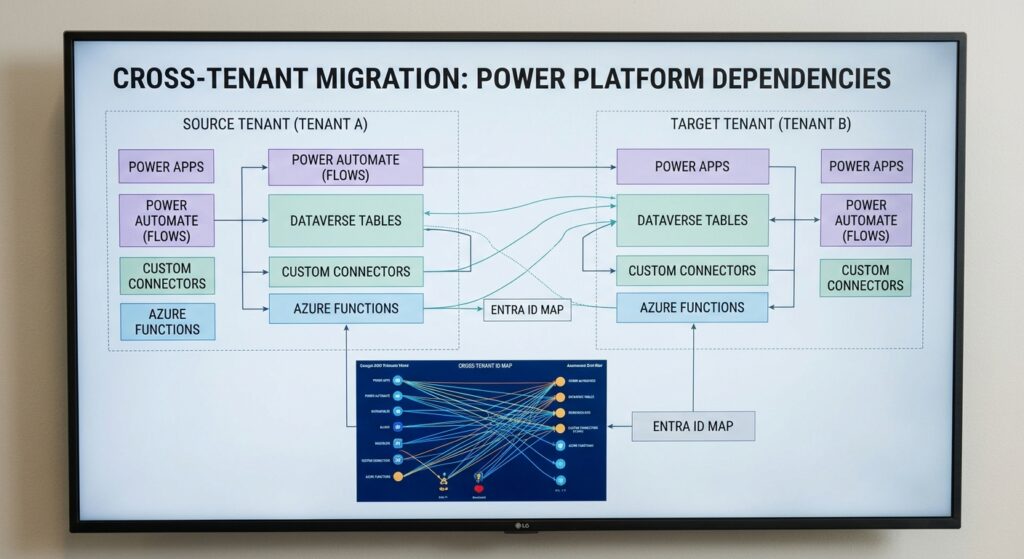
Cross-tenant Microsoft 365 migrations are traditionally planned around the major workloads: Exchange Online, SharePoint, OneDrive, Teams, and Microsoft Entra ID. However, as organizations modernize, another architectural layer quietly becomes one of the largest sources of post-cutover risk: Microsoft Power Platform.
In previous entries of our cross-tenant migration series, we explored the overlooked risks of tenant-to-tenant moves, evaluated what actually moves versus what stays behind, and established Microsoft Entra ID as the foundation most organizations ignore.
Now, we must look at where your business logic lives. Power Apps, Power Automate flows, Dataverse tables, custom connectors, and Azure integrations carry critical daily workflows, including employee onboarding and financial approvals. Unlike standard files or mailboxes, these solutions are deeply entangled with tenant-specific environments, service accounts, connection references, and identity scopes.
Why Power Platform Requires a Dedicated Migration Workstream
A core Microsoft 365 migration often looks linear: Source Tenant to Target Tenant. Power Platform operates as a complex web of structural dependencies:
Power Apps -> Power Automate -> Dataverse -> Connections -> Connection References -> Custom Connectors -> Azure Services -> Entra Identities -> Licensing
If even one link in this chain breaks during cutover, an application may launch successfully on a user’s desktop yet fail the moment they submit a transaction.
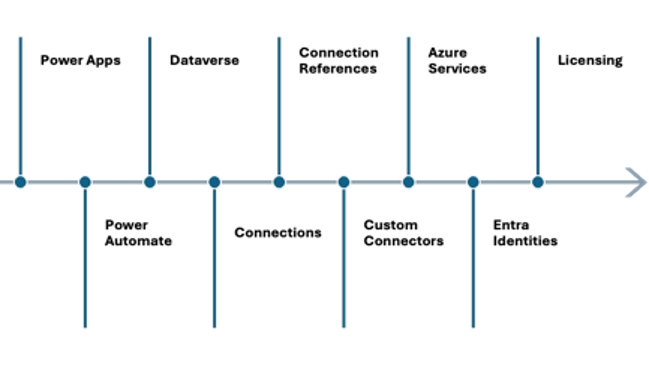
Onboarding Workflow Dependency Chain
Microsoft provides tenant-to-tenant environment migration capabilities, but key components like connections, gateways, and custom connector authentication do not migrate automatically. They must be manually reconfigured and validated.
Breaking Down High-Risk Components
1. Power Apps and Connection References
Canvas and model-driven apps often rely on environment variables and connection references to reach underlying data sources such as SharePoint, SQL, or Dataverse.
Apps exported and imported into a new tenant can retain stale source references or fail to map to target environment variables properly. Always package apps within ALM-compliant Solutions, and validate that target connection references point to newly authenticated target connections before opening the app to end users.
2. Power Automate
A flow showing a status of Enabled in the target tenant is not a guarantee of health.
Triggers and actions bound to personal user accounts or source-tenant service principals will fail upon cutover. Inventory all triggers, HTTP endpoints, service accounts, and child flows ahead of time. Post-migration testing must include triggering real automated, instant, and scheduled runs rather than just verifying flow visibility.
3. Custom Connectors and Azure Dependencies
Organizations frequently build custom connectors to bridge Power Platform with internal APIs, Azure Functions, or third-party platforms.
|
Component |
Migration Pitfall |
Recommended Action |
|
API Endpoints |
Hardcoded source URLs (api.source.com) |
Use Environment Variables for base URLs |
|
OAuth Settings |
Client IDs and secrets tied to source Entra ID |
Recreate App Registrations in target tenant |
|
Secrets and Keys |
Plaintext API keys stored in connectors |
Secure secrets using Azure Key Vault |
4. Licensing Enforcement
Do not assume that because a user had proper licensing in the source tenant, their applications will function post-migration. Premium connectors, Dataverse capacity, Process licenses, and Managed Environments require explicit licensing allocation in the target tenant.
With Microsoft broadly enforcing stricter Power Apps licensing requirements heading toward February 2027, reviewing your licensing posture during a migration is vital to avoid unexpected compliance blockages.
Component Migration Matrix
When mapping out your runbook, categorize components into clear technical action buckets:
|
Component |
Migration Approach |
Critical Post-Migration Action |
|
Power Apps / Flows |
Solution Export/Import or Tenant Environment Move |
Rebind connection references and test execution |
|
Dataverse |
Environment move or OData migration |
Validate record counts, relationships, and security roles |
|
Connections |
Manual Recreation |
Authenticate target credentials and service principals |
|
Custom Connectors |
Solution Import |
Re-enter secrets and client IDs, and update API host URLs |
|
Gateways |
Manual Reconfiguration |
Reinstall or rebind on-premises data gateways |
|
Licensing |
Tenant Provisioning |
Reassign Premium, Process, or Capacity licenses |
A Practical 5-Level Validation Framework
Validating a Power Platform migration requires testing far beyond confirming whether an app opens. Implement a phased validation approach:
- Platform Level: Verify environment access, admin roles, user mapping, and base licensing.
- Application Level: Confirm forms load, schema mappings match, and data sources render correctly.
- Automation Level: Execute manual, scheduled, and triggered flows. Review run history for hidden errors.
- Integration Level: Test custom API endpoints, Azure Key Vault secret retrieval, and service principal authentication.
- Business Process Level: Execute an end-to-end operational transaction. Submit a real request, verify Dataverse write-back, ensure approval notifications deliver, and confirm external system updates.
How Olive + Goose Can Help
Navigating a cross-tenant Microsoft 365 migration without disrupting daily operations requires specialized expertise across both identity and business logic.
At Olive + Goose, we treat Power Platform as a dedicated, first-class migration workstream. Our team assists across every stage:
- Discovery and Assessment: Deep-dive audits of your source Power Apps, flows, Dataverse schemas, custom connectors, and Azure dependencies.
- Architecture and Strategy: Designing ALM-compliant target environments, service principal strategies, and connection reference mappings.
- Execution and Remediation: Managing solution exports and imports, tenant environment moves, connection rebinding, and API endpoint reconfigurations.
- Comprehensive Validation and Hypercare: Executing end-to-end business process testing and offering immediate post-cutover support to keep your operations running smoothly.
Exchange mailboxes and SharePoint sites hold your organization’s data, but Power Platform holds its business intelligence and automated operations. A temporary delay in email delivery is an inconvenience. A broken automation that silently drops customer approvals or financial transactions is a major business issue.
By treating Power Platform as its own strategic workstream, discovering dependencies early, preparing target environments, and testing end-to-end processes, you protect your organization from hidden cutover risks.
References